This is the core problem workflow automation consulting solves. Not by handing you a software subscription and wishing you luck, but by redesigning how work moves through your business and then building the systems that make it run without constant human intervention.
This guide covers what workflow automation consulting actually involves, where it delivers the biggest returns for service businesses, and how to find the right partner to get it done.
Key Takeaways
- Workflow automation consulting is about redesigning processes first — software comes second.
- Service businesses — legal, medical, real estate, financial — gain the most from automation.
- The best consultants recommend, build, and implement the systems themselves.
- Automation frees your team from admin work; it doesn't replace them.
- Start with one workflow, prove ROI, then expand.
What Is Workflow Automation Consulting?
Workflow automation consulting is the practice of analyzing how tasks move through a business, finding where manual steps cause delays or errors, and then building systems that make those processes run faster, more accurately, and with less human intervention.
This isn't about buying a Zapier subscription and connecting two apps. Actual consulting involves:
- Strategy — identifying which processes are worth automating and in what order
- Process redesign — fixing broken workflows before any automation is built
- System integration — connecting your CRM, email, project management, and financial tools so data flows cleanly between them
- Change management — training your team and ensuring the new system actually gets used
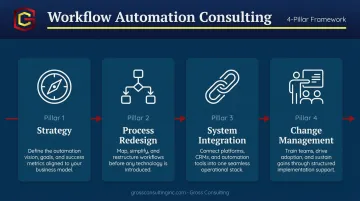
A consultant looks at the full operating loop: intake → routing → approvals → fulfillment → reporting. That's fundamentally different from clicking together a few triggers in an automation tool.
The Market Behind the Demand
This isn't a niche trend. The numbers make that clear:
- Business process automation is projected at $15.3 billion in 2025, growing to $33.4 billion by 2032 at an 11.7% CAGR, with services accounting for more than half that market
- The intelligent process automation market sits at $14.55 billion in 2024 and is projected to reach $44.74 billion by 2030
That scale reflects a broader shift in how businesses are investing in operations.
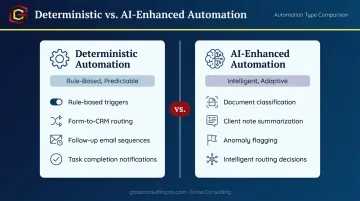
Modern automation consulting has moved well beyond simple rule-based triggers. Today's engagements blend traditional automation (deterministic, if-this-then-that logic) with AI capabilities that handle document classification, anomaly flagging, routing decisions, and data extraction — tasks that previously required human judgment to process.
What a Workflow Automation Consultant Actually Does
Diagnosing Before Building
Before touching any software, a consultant maps how work currently moves through your business — stakeholder interviews, tool stack audits, and documenting every step, handoff, and decision point. This surfaces the inefficiencies nobody has formally named:
- Approvals sitting in someone's inbox for three days
- Data re-entered manually across four different systems
- Decision points with no documented rules, just tribal knowledge
- Handoffs that stall because ownership was never assigned
That mapping process makes invisible complexity visible before any automation is written.
Redesigning Before Automating
Automation doesn't fix a broken process. It speeds it up — which means a broken process breaks faster and at higher volume.
A good consultant redesigns the workflow first: standardizing intake, clarifying decision rules, removing steps that exist out of habit rather than necessity. This is the phase most DIY automation projects skip, and it's the primary reason those projects fail. What gets automated next needs to actually work — otherwise you're just accelerating the mess.
Building the Actual System
Once the workflow is clean, implementation begins: configuring tools, building integrations, writing routing logic, setting up approval flows and notifications. The best implementations blend two types of automation:
- Deterministic automation (via tools like Zapier or GoHighLevel) for predictable, rule-based steps — routing a form submission to a CRM, triggering a follow-up email sequence, notifying a team member when a task is complete
- AI-enhanced automation for steps that require interpretation — classifying an incoming document, summarizing client notes, flagging an anomaly in a data set
Governance and Adoption
A well-built automation includes role-based access, audit logs, and exception handling — especially critical for attorneys, healthcare providers, and financial professionals operating under HIPAA, ABA, FINRA, or IRS recordkeeping requirements. These aren't optional add-ons; they're baseline requirements for regulated industries.
The engagement doesn't end at launch, either. A consultant trains the team, monitors performance against baseline metrics, and iterates — adjusting routing logic, tightening exception handling, and updating rules as the business changes.
Where Automation Delivers the Biggest Wins for Service Businesses
Not every workflow is equally worth automating. The highest ROI comes from processes that are repetitive, cross-functional, and slowed by manual handoffs or data re-entry. For service businesses specifically, four areas stand out.
Client Intake and Onboarding
For attorneys, doctors, and real estate investors, onboarding a new client typically involves collecting documents, verifying information, routing for internal review, and sending confirmation — all done manually across email, spreadsheets, and phone calls.
Automation can trigger the entire intake sequence from a single form submission.That means faster turnaround for the client and fewer dropped tasks for your team. Common steps that get automated in intake include:
- Document collection and e-signature requests
- ID verification triggers and compliance checks
- Internal routing to the right team member or department
- Automated confirmation emails and next-step instructions
Lead Follow-Up and CRM Management
Service businesses lose deals not because of poor service, but because follow-up falls through the cracks. A lead comes in on a Friday afternoon and nobody touches it until Tuesday.
Automated lead routing ensures every new contact is logged, tagged, and entered into a nurture sequence without anyone having to remember to do it. Sales reps and advisors focus on leads that are ready to convert — everything else runs automatically until that moment arrives. Platforms like GoHighLevel (GHL) are built specifically for this kind of CRM and sequence automation.
Billing, Invoicing, and Financial Operations
Manual invoice processing creates errors and compliance exposure — a genuine problem for accountants, credit repair companies, and professional service firms. According to Ardent Partners' 2024 AP benchmarks, best-in-class AP teams process invoices in 3.1 to 3.4 days at a cost of $2.78 to $2.81 each — compared to 17.4 days and $12.88 per invoice for peers. That gap is almost entirely explained by automation maturity.
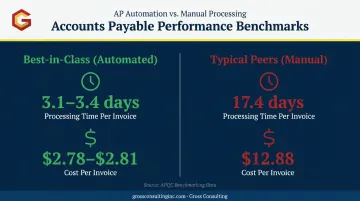
Automated invoice processing can scan documents, extract line-item data, route for approval, and push records directly into accounting software — without a human touching the document. Error rates and exception handling drop substantially as a result.
Internal Operations and Reporting
Many growing service businesses still compile status reports and performance metrics by hand — pulling numbers from five different tools into a spreadsheet every Monday morning.Automation aggregates that data on a schedule and pushes formatted reports to leadership automatically. No one has to build the deck. The numbers are just there.
For firms managing multiple clients or service lines, this also means a cleaner audit trail — dashboards reflect live data rather than last week's manual export.
The Workflow Automation Consulting Process, Step by Step
Step 1 — Discovery and Process Audit
The engagement starts with a complete picture of the current state: who does what, in what order, using which systems, and where things break down or stall. Stakeholder interviews, tool stack audits, and process mapping are the core activities here.
Most businesses discover meaningful inefficiency during this phase alone — handoffs that could be eliminated, steps that exist because "we've always done it this way," and data that gets manually re-entered into multiple systems because nobody ever built the integration.
Step 2 — Automation Roadmap and Prioritization
Findings from discovery get translated into a ranked automation backlog. Consultants rank workflows by time saved, error risk, and implementation effort. The roadmap defines scope, timeline, expected ROI, and tool recommendations — and it creates alignment before any building starts.
This phase prevents the common failure mode of starting with whatever is technically easiest rather than what delivers the most value.
Step 3 — Build, Integrate, and Test
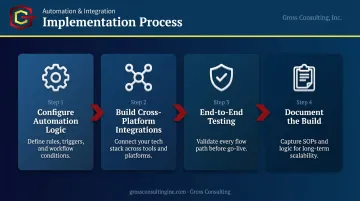
Implementation involves configuring the tools, building integrations between platforms, and thorough testing before go-live. The platforms in play typically include CRMs, email systems, project management software, and accounting tools.
System integration is where DIY projects most often collapse. Data must flow cleanly between tools without creating new manual steps in the gaps — and that requires prior experience with each connection, not trial and error. Gross Consulting's work across Zapier, GoHighLevel, and complementary CRMs means those integration patterns are already mapped before the build begins.
The core implementation activities include:
- Configuring automation logic within each platform
- Building cross-platform integrations so data flows without manual re-entry
- Testing each workflow end-to-end before go-live
- Documenting the build for ongoing team reference
Step 4 — Launch, Train, and Scale
Go-live includes team training, establishing baseline metrics (cycle time, error rate, backlog volume), and monitoring performance against those baselines. After the pilot workflow proves ROI, the same patterns get applied to adjacent workflows.
One proven workflow becomes a repeatable template. Applied across departments, that's how a single engagement compounds into an operational upgrade that touches the entire business. Gross Consulting's approach — blending AI, automation, and human expertise — is built to support clients through this full lifecycle. As Jaiden Gross puts it: "We don't just give advice. We build."
Why Service Businesses Should Hire a Consultant Instead of Going It Alone
The DIY Problem
Off-the-shelf tools are accessible. Zapier, Make, and GoHighLevel all have free tiers and YouTube tutorials. But McKinsey research found that only 16% of digital transformations both improved performance and sustained the change, while BCG puts the share of transformations that fall short of objectives at 70%.
What these failures share: treating automation as a tool rollout rather than an operating model change. DIY projects tend to be tool-first — building around what the software can do — rather than process-first. The typical outcomes:
- Point-to-point integrations that break when one app updates
- Undocumented systems that only one person understands
- Scope that never delivers measurable value because the underlying process was never fixed
Speed and ROI
A consultant has already navigated these pitfalls across dozens of engagements. They compress the timeline from analysis to working solution, which means the business starts capturing ROI faster. For small and mid-sized service businesses, that speed advantage often means the automation pays for the consulting engagement within months.
Compliance Is Not Optional
Speed matters, but for attorneys, accountants, and healthcare professionals, the stakes go beyond efficiency. Manual processes create direct compliance exposure.
Three frameworks that a well-governed automated system must account for:
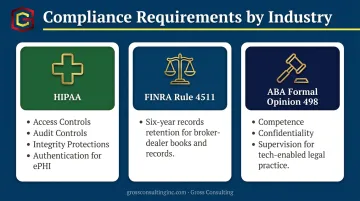
- HIPAA: Requires access controls, audit controls, integrity protections, and authentication for any electronic protected health information
- FINRA Rule 4511: Mandates a six-year records retention standard for broker-dealer books and records
- ABA Formal Opinion 498: Extends duties of competence, confidentiality, and supervision to technologically enabled legal practice
A properly built automated system enforces these requirements consistently. A patchwork of manual processes does not.
How to Choose the Right Workflow Automation Consulting Partner
The deciding factor isn't technical skill alone — it's whether the consultant builds or just advises. Some firms produce strategy documents and leave implementation to the client. For resource-constrained service businesses, that model delivers little value.
What you need is a partner who designs, builds, and manages the system end-to-end.
Key evaluation criteria:
- Sector-specific experience — Do they understand your workflows and compliance environment? A consultant who has worked with attorneys and healthcare providers will ask different questions than a generalist.
- Technology-agnostic approach — Are they recommending the right tool for your problem, or the one they have a financial incentive to sell?
- Clear change management plan — Do they train your team and ensure adoption, or hand over a system and disappear?
Questions to ask during vetting:
- Can you walk me through a real engagement from discovery to results?
- How do you define and measure success?
- What happens when our process changes after the system is live?
A partner who answers these confidently — with specifics, not generalities — is one who has actually delivered. A partner who hedges or deflects probably hasn't.
Frequently Asked Questions
What does a workflow automation consultant actually do?
A workflow automation consultant maps your current business processes, identifies inefficiencies and bottlenecks, redesigns the workflow for clarity, then builds and implements automation tools that make those processes run with minimal manual intervention. The consulting piece is the process redesign; the technical piece is the implementation.
How much does workflow automation consulting cost?
Pricing varies by scope — hourly, flat-fee project, and monthly retainer models are all common. Focused single-workflow projects may run a few thousand dollars; multi-workflow engagements scale higher. The real measure is ROI: if automating your client intake saves 20 hours per month, the consulting fee pays for itself fast.
How long does it take to see results?
Quick wins — automating a single intake form or follow-up sequence — can show measurable time savings within weeks. Larger multi-workflow projects typically deliver full ROI within 6 to 12 months. Most businesses see the payback accelerate as automated workflows are extended to adjacent processes.
What types of workflows are best suited for automation?
The best candidates are repetitive, rule-based processes with clear inputs and outputs: client intake, invoice processing, lead routing, and status reporting. Workflows with frequent manual handoffs, data re-entry across multiple systems, or high error rates are the top priorities.
Is workflow automation consulting only for large companies?
Small and mid-sized service businesses often see faster and bigger returns because their workflows are more visible and ownership is clearer. The main requirement is having at least one repeatable process with a measurable outcome — most service businesses have several before they've even looked for them.
What's the difference between using automation software myself versus hiring a consultant?
DIY automation is tool-first: you build around what the software can do. Consulting is process-first: you redesign how work flows, then automate it. Consultants also document systems, handle team adoption, and design for scalability — so automations don't break the moment one app updates or one employee leaves.