Introduction
You're running ads. You've invested in SEO. Traffic is coming in — but the phone isn't ringing. For many service business owners, this is the most frustrating gap in their entire growth strategy.
Getting visitors to your site is only half the equation. If your website isn't built to convert, every dollar you spend driving traffic is working at a fraction of its potential.
According to Ruler Analytics' 2026 benchmark report, the average conversion rate across industries is 5.13% — meaning nearly 95 out of every 100 visitors leave without taking action. For legal and professional services, that number climbs to 7.9% and 6.1% respectively, but only when those sites are optimized to perform.
That gap between traffic and leads is a conversion problem — and it's one of the most fixable issues in your growth strategy. This guide breaks down exactly how service businesses like law firms, medical practices, and consulting firms close it.
Key Takeaways
- Conversion rate optimization (CRO) turns existing traffic into more leads without increasing ad spend.
- Your hero section, trust signals, and CTAs are the highest-leverage conversion elements.
- Page speed, mobile experience, and form simplicity determine whether visitors convert or bounce.
- SEO and CRO work together — optimizing one strengthens the other.
- Data and A/B testing, not assumptions, should drive every optimization decision.
What Is Website Conversion Optimization?
Conversion rate optimization (CRO) is the systematic process of increasing the percentage of website visitors who complete a desired action — submitting a contact form, booking a consultation, calling your office, or downloading a resource.
How to Calculate Your Conversion Rate
The formula is simple:
(Number of Conversions ÷ Number of Visitors) × 100 = Conversion Rate
For example: 50 form submissions from 2,000 monthly visitors gives you a 2.5% conversion rate.
What Counts as a Conversion?
"Conversions" aren't universal — they depend entirely on your business model:
- Attorneys and doctors: A booked consultation or intake form submission
- Real estate firms: A property inquiry or investor application
- Consultants: A strategy call request or lead magnet download
- eCommerce brands: A completed purchase
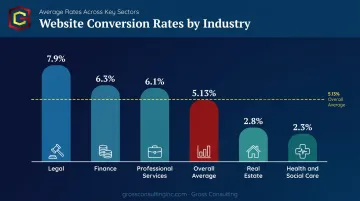
Industry benchmarks from Ruler Analytics' 2026 dataset — covering 110M+ sessions — show meaningful variation by sector:
| Industry | Average Conversion Rate |
|---|---|
| Legal | 7.9% |
| Professional Services | 6.1% |
| Finance | 6.3% |
| Real Estate | 2.8% |
| Health and Social Care | 2.3% |
| Overall Average | 5.13% |
Use these numbers as a benchmark for your own site. A 1–2% conversion rate in an industry averaging 6%+ means your traffic budget is working harder than it needs to — optimizing conversions first will get you more from the visitors you already have.
Why CRO Matters More Than Just Getting More Traffic
The Math Argument for CRO
Consider this: if your site receives 3,000 visitors a month and converts at 1%, you're generating 30 leads. Improve that conversion rate to 2% — without a single additional visitor — and you're suddenly generating 60 leads. Same traffic budget, doubled output.
That's the core business case. CRO effectively lowers your cost per lead without touching your ad spend.
The Search Landscape Is Shifting
That efficiency argument becomes even more urgent when you look at what's happening to traffic itself. Research from Ahrefs in 2026 found that AI Overviews reduced organic click-through rates for position-one content by 58%, based on analysis of 300,000 keywords.
Zero-click searches are no longer a fringe concern — they're mainstream. For service businesses depending on organic traffic, this means every visitor who does click through carries more weight than ever before.
The Mindset Shift
High-growth service businesses stop asking "How do I get more visitors?" and start asking "How do I get more value from the visitors I already have?"
Traffic acquisition is expensive and increasingly volatile. Your website's ability to convert is an asset you control entirely, and every improvement you make to it compounds over time.
Essential Website Elements That Drive Conversions
Clarity and Value Proposition Above the Fold
The first thing a visitor sees — your hero section — must immediately answer three questions: Who do you help? What do you offer? Why should they trust you?
A vague or generic headline is one of the most common conversion killers. Compare:
- ❌ "Welcome to Our Law Firm" (tells visitors nothing)
- ✅ "We Help Injured Workers Win the Compensation They Deserve" (specific, outcome-focused)
A strong hero section pairs a benefit-driven headline (aim for 10 words or fewer that express your USP) with a specific, action-oriented CTA. For a medical practice, that might be "Get Same-Week Appointments for Workers' Comp Cases." For a consulting firm, "Save 10+ Hours a Week on Client Intake" speaks directly to an attorney's daily workload.
The message has to match what your target audience actually cares about — not what you think sounds professional.
Trust Signals and Social Proof
Service business clients — people hiring attorneys, doctors, or financial consultants — are making high-stakes decisions. They need to trust you before they'll act.
According to BrightLocal's 2024 Local Consumer Review Survey, 85% of consumers say positive reviews make them more likely to use a business, and 31% will only work with businesses rated 4.5 stars or higher.
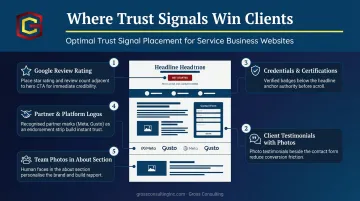
Trust signals that actually move the needle:
- Client testimonials with full names, photos, and specific outcomes
- Google review ratings displayed prominently
- Professional credentials, certifications, and accreditations
- Partner or platform logos (these serve as institutional endorsements)
- Team photos — they humanize the brand and reduce perceived risk
Placement matters as much as presence. Social proof is most effective when positioned directly next to a CTA button, adjacent to a contact form, or on a pricing page — right where the visitor is making a decision. A testimonial buried in the footer does almost nothing.
Contact Accessibility and CTAs
Trust earns the click — but your CTA design has to close it. Every page should make the next step effortless. For service businesses, that means:
- Phone number prominently visible in the top-right corner (click-to-call on mobile)
- A contact or inquiry form accessible without scrolling excessively
- A live chat or chatbot option for visitors who aren't ready to call
Remove any one of these, and you'll lose leads before they ever reach out. A site that makes visitors hunt for a phone number — especially on mobile — is doing the competitor's job for them.
On CTA copy: "Contact Us" and "Submit" are conversion dead-ends. They're generic, passive, and communicate nothing about value. Gross Consulting's own site uses language like "Book My Free Strategy Call" and "Request My Free Consultation" — phrases that are specific, first-person, and benefit-oriented.
Test alternatives like:
- "Get Your Free Case Review" (law firms)
- "Schedule a Same-Week Appointment" (medical practices)
- "Claim Your Free Growth Audit" (consultants)
The right CTA takes testing — but specificity wins every time. "Get Your Free Case Review" will outperform "Contact Us" in nearly every split test.
Proven CRO Best Practices for Service-Based Businesses
Optimize Page Load Speed and Mobile Experience
Slow sites kill conversions before visitors ever see your offer. Research from Portent found that B2B sites loading in 1 second converted at nearly 3x the rate of sites loading in 5 seconds — and 5x the rate of sites taking 10 seconds to load.
For service businesses where most local searches happen on mobile, a sluggish site isn't just a UX problem — it's a direct revenue leak.
Quick wins to prioritize:
- Compress and properly size all images
- Remove unnecessary third-party scripts and plugins
- Ensure all CTAs and forms function correctly on mobile screens
- Test your site on actual mobile devices, not just a desktop browser preview
A potential client searching for an attorney or doctor on their phone wants to act immediately. Any friction at that moment — a slow load, a broken form, a CTA that doesn't tap correctly — costs you the lead.
Simplify Forms and Reduce Friction
Long forms are one of the most reliable ways to destroy conversion rates. For top-of-funnel lead capture, a good service business form typically needs three things: name, email, and one qualifying question.
HubSpot found that multiple dropdown fields are consistently associated with lower conversion rates. The psychological principle here is straightforward — people prefer to finish what they start. Getting a visitor to complete even one small step makes them more likely to continue through the rest of the process.
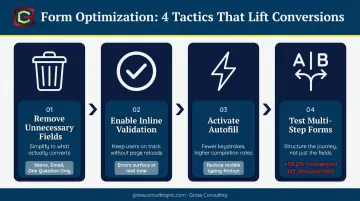
Form optimization tactics that work:
- Remove any field that isn't strictly necessary for the first interaction
- Use inline validation so errors appear in real time, not after submission
- Enable autofill to reduce typing friction on mobile
- Test multi-step forms against single-step — HubSpot documented one case where converting a single-step form into a multi-step form increased conversions by 59.2%
Gross Consulting's own free consultation form uses just three fields: first name, email, and a message. That's intentional — it's about capturing the lead first, then qualifying later.
Once your forms are optimized, the next layer is recovering visitors who are about to leave without converting at all.
Use Exit-Intent Popups and Urgency Strategically
Exit-intent technology triggers a popup when a visitor is about to leave the page — a last opportunity to capture the lead before they bounce. For service businesses, effective exit-intent offers include:
- Free consultations or strategy calls
- Downloadable guides or checklists relevant to the visitor's problem
- A first-session discount for practices where that's appropriate
Urgency and scarcity — "Only 3 consultation slots open this week" — can accelerate decisions. The key word is real. Fake countdown timers that reset every visit erode trust fast, and in professional service contexts, trust is everything. Ethical urgency is actual scarcity; manufactured urgency is just noise.
Video takes that trust-building one step further — giving visitors a direct look at who they'd actually be working with.
Use Video and Authentic Multimedia
Video builds credibility faster than text. For law firms, medical practices, and consulting firms, a short "meet the team" or "here's how we work" video can increase time on page and directly support conversions. High production quality is not required — authenticity typically outperforms polished corporate content in professional service contexts.
What works visually on service business sites:
- Short founder or team introduction videos (60–90 seconds)
- Before/after outcome visuals for industries where that's relevant
- Facility or office photos that humanize the practice
- Educational content that demonstrates expertise and reduces perceived risk
Visitors who can see your face, hear your voice, and understand your process before the first call show up warmer — and convert at higher rates once they do.
Building and Measuring Your CRO Strategy
Define Goals Before Making Changes
Before touching anything on your site, define what a conversion means for each key page. Not every page shares the same goal:
- Homepage: Book a call or initiate contact (primary); download a resource or subscribe (secondary)
- Service pages: Request a consultation (primary); view pricing or read case studies (secondary)
- Blog posts: Download a lead magnet or click an in-text CTA (primary); share or subscribe (secondary)
Without this clarity, you'll be optimizing toward the wrong outcomes.
Use Data, Not Assumptions
Gut-feel changes are guesses. CRO decisions grounded in user behavior data are investments. Gross Consulting's engagements include heatmap studies and behavioral analytics to understand where users actually click, scroll, and drop off — before recommending any changes.
High-priority pages to analyze first:
- Homepage (first impression, highest traffic)
- Contact and inquiry pages (closest to conversion)
- Service/landing pages (where the decision is made)
- Pricing pages (where objections peak)
Validate with A/B Testing
A/B testing is the standard method for proving that a change actually improves conversions — not just looks better. Run one variable at a time: headline, CTA text, form length, or hero image. Measure results before rolling anything out universally.
The math adds up fast: a 0.5% conversion improvement on a 3,000-visitor-per-month site generates 15 additional leads each month. Over a year, that's 180 extra leads from a single test — with zero additional traffic spend.
For service businesses balancing operations, client delivery, and growth at once, sustaining a CRO strategy without the right infrastructure is a real challenge. Gross Consulting designs, implements, and manages the full conversion-focused setup — so testing, analysis, and iteration happen consistently, not just when there's bandwidth.
How CRO and SEO Work Together
SEO drives traffic to your site. CRO converts that traffic into leads and clients. The two strategies are interdependent — weakening either one limits what the other can deliver.
A page that ranks on page one but fails to convert wastes every dollar and hour of SEO investment that put it there. A high-converting page that nobody finds has the same problem — just from the opposite direction.
Where They Reinforce Each Other
When page content matches search intent precisely, both rankings and conversions improve. Visitors who find exactly what they searched for are more likely to stay, engage, and act. That behavior feeds back into SEO performance in measurable ways:
- Longer session duration signals relevant, useful content
- Lower bounce rates indicate the page is meeting user expectations
- Higher engagement correlates with stronger rankings, per Semrush's 2024 Ranking Factors study — though Google hasn't formally confirmed these as direct signals
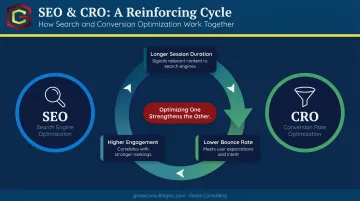
The result: optimizing for conversion often improves your organic visibility at the same time.
The Practical Move for Service Businesses
That insight points directly to a practical starting move. Identify your highest-traffic blog posts or service pages with low conversion rates. These are your highest-ROI CRO targets — the traffic is already there, you just need to capture it.
Add a relevant lead magnet, an in-text CTA, or an embedded contact form to an already-visited page. That single change costs almost nothing to implement and can generate consistent leads from traffic you're already working to attract — whether through SEO, paid ads, or referrals.
Frequently Asked Questions
What is website conversion optimization?
Website conversion optimization (CRO) is the process of improving your site so a higher percentage of visitors take a desired action — like booking a consultation, submitting a form, or making a purchase — without needing to increase traffic. It focuses on getting more value from the visitors you already have.
How do you improve your website conversion rate?
Start with the highest-impact levers: clarify your value proposition above the fold, strengthen CTAs with specific benefit-driven language, add trust signals near decision points, and reduce friction in your forms. Use heatmaps and A/B testing to make data-driven decisions rather than guessing.
What is CRO vs. SEO?
SEO focuses on getting more visitors to your site through search rankings. CRO focuses on converting the visitors you already have into leads or clients. The two work together: SEO brings the traffic, CRO turns that traffic into revenue.
Is a 12% conversion rate on a website good?
Yes — a 12% rate is well above average. Industry averages range from 2.3% to 7.9% depending on sector, placing 12% near or above the top quartile for most industries. That said, "good" always depends on your traffic source, page type, and business model.
How long does it take to see results from CRO?
Some changes — like improving CTA copy or adding trust signals — can show measurable impact within weeks. Larger structural tests require enough traffic to reach statistical significance, which typically takes 4–8 weeks or longer depending on your site's volume.