Introduction
Many small business owners excel at their craft, whether practicing law, treating patients, or managing investment properties, but find their financial records scattered across shoeboxes, spreadsheets, and forgotten email receipts. Cash flow remains unclear. Tax season becomes a scramble. This disorganization isn't just inconvenient; it's dangerous. According to a widely cited U.S. Bank study, 82% of small businesses that fail do so because of poor cash flow management, a problem rooted in inadequate bookkeeping systems that fail to track receivables, expenses, and cash position in real time.
This guide covers what bookkeeping is, how to set it up, the essential tasks to master, the tools that simplify the process, and when to bring in professional support. If you're a service-based business owner who wants real clarity over your finances, what follows gives you a practical starting point, not theory, but a workable system.
Key Takeaways
- Bookkeeping tracks every transaction. Without it, cash flow and tax obligations stay invisible
- Choose the right method: double-entry with accrual basis for most growing businesses
- Consistent weekly habits prevent costly mistakes and tax surprises
- Proper tools and professional support make the process manageable
- Clean books are a prerequisite for loans, investor conversations, and scaling
What Is Bookkeeping and Why Does It Matter for Your Small Business
Bookkeeping is the practice of recording, organizing, and maintaining every financial transaction in your business. Bookkeeping handles the mechanics - tracking every dollar in and out. Accounting takes that data further, interpreting it to inform strategy, prepare tax returns, and assess financial health. The two work together, but bookkeeping is the foundation everything else rests on.
Why bookkeeping matters:
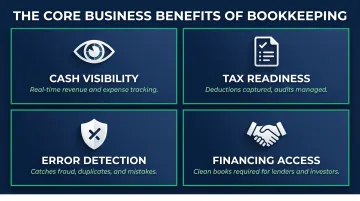
- Real-time visibility into revenue, expenses, and cash position - so you know which opportunities to pursue and which costs to cut
- Organized records mean deductions are captured, estimated payments land right, and an audit doesn't become a crisis
- Regular reconciliation catches unauthorized charges, duplicate payments, and data entry mistakes before they snowball
- Lenders and investors require clean financial statements - no clean books, no approval
The stakes are higher than most owners realize. CB Insights found that 70% of failed startups cited running out of capital as a primary reason for shutdown. Businesses that track cash flow weekly spot the warning signs early - and have time to redirect spending, renegotiate terms, or secure a line of credit before the situation becomes critical.
Key financial records every small business must maintain:
- Profit & Loss Statement (Income Statement) - Shows total revenue minus total expenses over a period, revealing whether you're profitable
- Balance Sheet - Snapshot of assets, liabilities, and equity at a specific point in time; reflects net worth and financial stability
- Cash Flow Statement - Tracks actual cash moving in and out, highlighting whether you can cover bills even if you're profitable on paper
- Payroll Records - Documents wages, withholdings, benefits, and tax obligations for employees and contractors
- Tax Documentation - Organized receipts, invoices, and expense records that substantiate deductions and support IRS compliance
Bookkeeping Methods: Single-Entry, Double-Entry, Cash, and Accrual
Entry Systems: Single vs. Double
Think of single-entry bookkeeping like a checkbook register: one entry per transaction, income logged when received, expenses when paid. It works well for sole proprietors or micro-businesses with minimal transactions and simple finances. The tradeoff is no built-in error checking and limited visibility into assets, liabilities, or equity.
Double-entry bookkeeping records every transaction as both a debit and a credit, built around one core equation: Assets = Liabilities + Equity. Because every entry must balance, the system catches errors automatically and gives you a complete financial picture. It's the standard for any small business planning to grow, seek financing, or bring on investors - and it's what U.S. accounting standards require.
Accounting Methods: Cash vs. Accrual
| Cash-Basis | Accrual-Basis | |
|---|---|---|
| Records income | When cash is received | When earned (invoice sent) |
| Records expenses | When paid | When incurred (bill received) |
| Best for | Freelancers, micro-businesses | Growing businesses, recurring billing |
| Limitation | Misses outstanding invoices/bills | More complex to maintain |
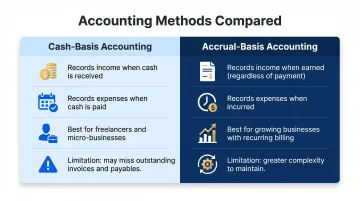
Cash-basis is simpler day-to-day, but it can paint a misleading picture of your financial health, especially if you're carrying unpaid invoices or deferred expenses. Accrual gives you a more accurate view, which matters when you're planning for growth or managing client retainers.
IRS restrictions: Under IRC Section 448, businesses may use cash-basis accounting if their average annual gross receipts over the prior three tax years are $31 million or less (for the 2025 tax year). Qualified personal service corporations, including attorneys, doctors, and consultants, are exempt from this threshold and may use cash-basis accounting regardless of revenue.
Which combination is right for you?
- Freelancers or solo practitioners - Start with single-entry and cash-basis to minimize complexity
- Growing service businesses with employees - Use double-entry and accrual to track receivables, payables, and financial obligations accurately
- Businesses planning to scale, secure loans, or bring on investors - Accrual accounting is essential; lenders and investors require it
How to Set Up Bookkeeping for Your Small Business
Step 1: Separate Business and Personal Finances
Open a dedicated business checking account immediately. Mixing personal and business finances creates accounting errors, complicates tax preparation, and can expose you to personal liability.
According to Cornell Law, courts explicitly consider "intermingling of personal and corporate assets" when deciding whether to pierce the corporate veil, meaning sloppy bookkeeping could cost you your LLC liability protection.
Consider opening a separate savings account to set aside funds for quarterly estimated taxes.
Step 2: Create a Chart of Accounts
A chart of accounts is a categorized list of all financial accounts in your bookkeeping system, organized into five categories:
- Assets - Cash, accounts receivable, equipment
- Liabilities - Accounts payable, loans, credit card balances
- Equity - Owner contributions, retained earnings
- Income - Service revenue, product sales, interest income
- Expenses - Rent, payroll, software, professional fees
This structure keeps every transaction categorized and ensures your financial reports, income statements, balance sheets, cash flow, reflect an accurate picture of the business. Most accounting software includes default charts of accounts that you can customize to your business.
Step 3: Choose and Set Up Your Bookkeeping System
Your two main options are spreadsheets and accounting software, and the gap between them matters.
Spreadsheets are low-cost but manual and error-prone. They work for early-stage businesses but don't scale.
Accounting software automates transaction imports, categorization, reconciliation, and reporting. Look for:
- Bank account integration
- Automated transaction categorization
- Invoice and payment tracking
- Financial report generation
- Payroll integration (if you have employees)
- Cloud-based access for real-time data
Connect your bank accounts, set expense categories aligned with your chart of accounts, and establish a consistent recording schedule - weekly is best practice.
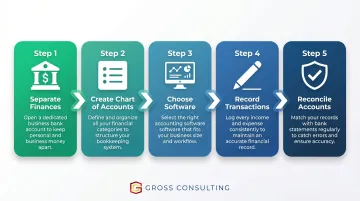
Step 4: Record Every Transaction
Once your system is configured, the discipline of recording transactions consistently is what makes it useful. Every sale, bill, payment, and transfer should be logged with:
- Date
- Amount
- Description
- Category
Keep digital copies of all receipts and invoices. These back up your deductions during audits and keep you covered if the IRS comes calling. Many accounting platforms include receipt-scanning features that attach images directly to transactions.
Step 5: Reconcile Accounts Regularly
Bank reconciliation compares your recorded transactions against bank and credit card statements to catch:
- Discrepancies or missing transactions
- Duplicate charges
- Unauthorized payments or fraud
Reconcile at minimum monthly; weekly reconciliation is recommended for businesses with high transaction volume. Most accounting software handles this by importing bank feeds and flagging unmatched items automatically - so consistent reconciliation becomes less about manual checking and more about reviewing what the software surfaces. Clean reconciled books mean accurate reports, faster tax prep, and no surprises come audit season.
Essential Bookkeeping Tasks Every Small Business Owner Should Know
Tracking Income and Expenses
Every revenue source and every cost must be consistently recorded and categorized. Examples for service businesses include:
- Client invoices and payments
- Contractor or vendor payments
- Software subscriptions
- Office rent and utilities
- Professional fees (legal, accounting)
Proper categorization directly impacts tax deductions. Miscategorized expenses mean missed write-offs and overpaid taxes.
Managing Accounts Receivable and Payable
Accurate categorization is only half the picture - you also need to know who owes you money and who you owe. Accounts receivable is money clients owe you. Accounts payable is money you owe vendors or suppliers.
Tracking both is critical:
- Late client payments hurt cash flow and create uncertainty
- Late vendor payments damage relationships and harm your credit
Set up automated invoice reminders for clients and establish a consistent bill-payment schedule to stay current on both sides.
Running Key Financial Reports
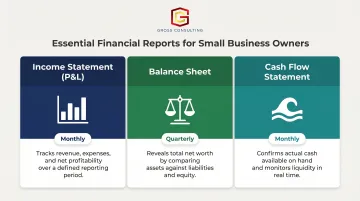
Turn raw bookkeeping data into actionable intelligence by generating:
- Income Statement (P&L) - Monthly; tracks profitability and whether revenue covers expenses
- Balance Sheet - Quarterly; shows net worth and the relationship between assets and liabilities
- Cash Flow Statement - Monthly; confirms you have enough cash on hand, even when you're profitable on paper
These reports inform strategic decisions, reveal problems early, and communicate financial health to lenders or investors.
Preparing for Tax Season Year-Round
Bookkeeping should make tax season a non-event, not a crisis. Key habits:
- Set aside a percentage of revenue regularly for estimated taxes (20-30% is typical for service businesses)
- Track deductible business expenses throughout the year
- Maintain organized digital records
- Make quarterly estimated tax payments
IRS rules require that individuals, sole proprietors, partners, and S-corp shareholders pay quarterly estimated taxes if they expect to owe $1,000 or more for the year. Payments fall due April 15, June 15, September 15, and January 15. To avoid underpayment penalties, pay at least 90% of your current-year tax liability, or 100% of the prior year's tax (110% if your prior-year AGI exceeded $150,000).
Managing Payroll Records
Payroll is one of the most compliance-sensitive areas of bookkeeping. You must accurately track:
- Gross wages and net pay
- Federal, state, and local tax withholdings
- Benefits and retirement contributions
- Employer tax obligations (FICA, unemployment)
Payroll errors are a common source of IRS penalties. Payroll software that integrates with your bookkeeping system, such as Gusto, automates calculations, filings, and record-keeping so errors don't slip through. Gross Consulting works with clients on payroll setup as a Verified Gusto Accountancy Partner.
Best Bookkeeping Tools and Software for Small Businesses
The right software eliminates hours of manual work and keeps your books audit-ready year-round. Before comparing platforms, know which features actually matter for a service business.
Core features to prioritize:
- Automated transaction categorization
- Bank reconciliation
- Invoicing and payment tracking
- Financial report generation
- Payroll integration
- Cloud-based access
- Multi-user support (as you grow)
Popular platforms for service-based small businesses:
| Platform | Starting Price | Best For | Key Features |
|---|---|---|---|
| QuickBooks Online | $38/month | Most businesses; broadest feature set | Industry-standard, extensive integrations, accountant-friendly |
| FreshBooks | $23/month | Service businesses with heavy invoicing | Client-based pricing, proposals, retainers, time tracking |
| Xero | $25/month | Growing teams needing multi-user access | Unlimited users on all plans, strong integrations |
| Wave | Free (Starter plan) | Very small businesses with basic needs | Free accounting and invoicing; paid payroll add-on |
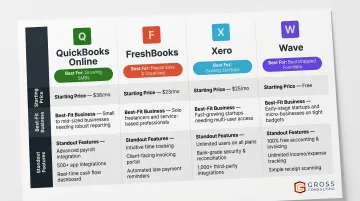
Pricing reflects regular rates; promotional discounts are frequently available for new users.
Cloud-based advantages:
- Real-time access to financial data from anywhere
- Automatic backups reduce risk of data loss
- Easier collaboration with accountants or bookkeepers
- Live bank feed sync keeps transaction records current without manual imports
For service businesses under 50 transactions per month, any of the starter-tier options above will cover the basics without overspending. Once payroll enters the picture or your transaction volume climbs, budget for a mid-tier plan - the added automation pays for itself quickly in time saved.
Common Bookkeeping Mistakes Small Business Owners Make
Mistake 1: Mixing Personal and Business Finances
Beyond inconvenience, commingling funds can pierce the corporate veil for LLCs, complicate tax filings, and produce inaccurate financial statements that distort business decisions. Courts treat intermingling as evidence that the business isn't a separate legal entity, exposing you to personal liability.
Fix: Use dedicated business accounts and cards exclusively. Never pay personal expenses from business accounts.
Mistake 2: Falling Behind and Waiting Until Tax Season
The longer records go unrecorded, the more likely transactions are missed, receipts are lost, and deductions are overlooked. According to the NSBA 2024 Small Business Taxation Survey, the majority of small-business owners spend more than 20 hours per year dealing with federal taxes, even those who outsource tax preparation. Messy records make that number climb fast.
Fix: Block 30 minutes weekly for bookkeeping. Consistent small efforts prevent months of painful catch-up.
Mistake 3: Not Reconciling Accounts Regularly
Skipping reconciliation allows errors, unauthorized charges, and fraud to go undetected. What starts as a $12 mystery charge can signal a billing error, or worse, fraud, that's been running for months.
Reconcile bank and credit card accounts monthly at minimum. A recurring calendar reminder is all it takes to stay consistent.
Mistake 4: Failing to Set Aside Money for Taxes
Many small business owners fall into the "tax surprise" trap, spending revenue that should have been reserved for quarterly estimated taxes. The IRS charges penalties for underpayment.
The fix is straightforward:
- Open a dedicated tax savings account
- Transfer a fixed percentage (typically 20–30% for service businesses) every time revenue hits
- Treat it as a non-negotiable line item, not an afterthought
DIY Bookkeeping vs. Hiring a Professional: What's Right for You?
The Case for DIY Bookkeeping
- Cost savings - Software costs $25-$90/month vs. $400+ for outsourced services
- Full control - Direct visibility into every transaction
- Accessible tools - Modern platforms are designed for non-accountants
Signs It's Time to Outsource
- Bookkeeping consumes more than a few hours per week
- Financial records are frequently inaccurate or incomplete
- You're missing tax deadlines or overlooking deductions
- Your business has grown to include payroll, multiple revenue streams, or complex expenses
- You're preparing for a loan application or investor conversation
Understanding the Difference
- Bookkeeper - Manages daily transaction recording, reconciliation, and report generation
- Accountant or CPA - Interprets financial data, advises on strategy, handles tax filings, and provides compliance guidance
Cost benchmarks:
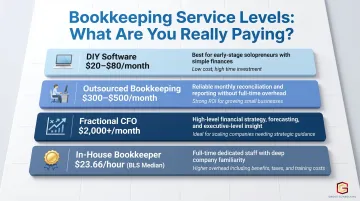
- DIY with software: $20-$80/month depending on platform
- Outsourced bookkeeping: $300-$500/month for basic services; starting around $399/month for monthly closes with dedicated team support
- Fractional CFO services: $2,000+/month for strategic planning and cash flow analysis
- BLS median bookkeeper hourly wage: $23.66/hour ($49,210 annually)
Why clean books matter for growth:
Those cost benchmarks only tell part of the story. For service-based businesses, accurate bookkeeping isn't just a compliance checkbox - it directly affects your ability to get a loan, spot what's driving profit, and make confident decisions about where to grow next.
Firms like Gross Consulting work with service businesses to build financial systems, bookkeeping processes, budgeting frameworks, and compliance support, that support real growth milestones. When the numbers are clean and current, founders spend less time guessing and more time leading.
Frequently Asked Questions
What are the 5 basic principles of bookkeeping?
The five foundational principles are:
- Revenue recognition - record income when earned, not when cash arrives
- Expense matching - match expenses to the period they relate to
- Consistency - use the same methods from period to period
- Full disclosure - record all relevant transactions without omission
- Objectivity - base records on verifiable evidence, not estimates
What is the best bookkeeping method for a small business?
Double-entry bookkeeping combined with accrual-basis accounting is the right choice for most small businesses. This combination provides the most accurate picture of financial health, tracks assets and liabilities completely, and better supports long-term planning and scaling.
What is the best bookkeeping app for a small business?
QuickBooks Online is the most feature-rich and widely used, making it easy to collaborate with accountants. FreshBooks suits service businesses with heavy invoicing needs. Wave is a solid free option for very small businesses with basic requirements.
What is the cost for small business bookkeeping?
DIY with software typically costs $20–$80/month depending on the platform. Outsourced bookkeeping services generally range from $300–$500/month for basic services, with costs increasing based on transaction complexity, payroll, and reporting needs.
How to find a bookkeeper for a small business?
Prioritize industry experience, proficiency in your accounting software, and familiarity with relevant tax regulations. Ask your accountant or peers for referrals, check credentials, and interview at least two or three candidates before committing.
What is a professional who keeps track of financial records?
A bookkeeper records and organizes daily financial transactions. An accountant interprets that data, prepares financial statements, and handles tax strategy. For basic record-keeping, hire a bookkeeper - for tax planning and financial guidance, bring in a CPA.