This guide breaks down exactly what Meta Ads Manager is, how it's structured, what it costs, and how service businesses can use it to reach the right people and generate real leads.
Key Takeaways
- Meta Ads Manager is the platform for creating and managing paid campaigns across Facebook, Instagram, Messenger, and beyond — all from one dashboard
- Every campaign follows a three-level structure: Campaign → Ad Set → Ad
- The platform has no access fee — you pay only for the ads you run
- Audience targeting includes demographic filters, Custom Audiences, Lookalike Audiences, and AI-powered Advantage+ Audience
- Track performance using cost per lead, CTR, and cost per result — and give Meta's algorithm time to stabilize before drawing conclusions
What Is Meta Ads Manager?
Meta Ads Manager is Meta's centralized platform for building, managing, and tracking paid ad campaigns. From one dashboard, businesses can run ads across Facebook, Instagram, Messenger, WhatsApp, Threads, and the Meta Audience Network — reaching people across Meta's full family of apps.
The core value is control. Rather than guessing who might see your content organically, Ads Manager lets you define exactly who sees your ads — along with when, where, and how much you spend. Backed by Meta's AI delivery system, that level of precision is what makes paid advertising fundamentally different from organic posting.
What's Inside the Platform
Key tools available inside Meta Ads Manager include:
- Campaign creation with six distinct objectives
- Audience building using demographics, interests, behaviors, and AI-powered targeting
- Budget and schedule controls at both the campaign and ad set level
- Creative uploads for images, videos, carousels, and more
- Performance reporting broken down by campaign, ad set, and individual ad
- A/B testing to compare audiences, creatives, and placements
- Meta Advantage+ — Meta's AI-powered suite for optimizing delivery in real time
Why This Matters for Service Businesses
The scale of Meta's reach is hard to ignore. According to Meta's Q1 2026 results, Meta's Family of Apps averaged 3.56 billion daily active people in March 2026. For a law firm, medical practice, or real estate investment firm running targeted campaigns, that audience base — filtered down to the right geographic area, income level, and behavioral signals — represents a substantial lead generation opportunity.
That opportunity only materializes when campaigns are built with the right structure behind them. Gross Consulting, a Verified Meta Business Partner based in Boulder, CO, works directly inside Meta's ecosystem to help service businesses across these verticals design and manage campaigns built to generate real leads — not just impressions.
Meta Ads Manager vs. Meta Business Suite
These two platforms are often confused — but they serve distinct purposes.
Meta Ads Manager is dedicated entirely to paid advertising. It's where you create campaigns, define audiences, set budgets, upload creative, and track ad performance.
Meta Business Suite is the broader platform for managing your Facebook and Instagram presence — publishing posts, responding to messages, reviewing organic insights, and accessing tools including Ads Manager. It's the central dashboard for your overall Facebook and Instagram presence, with Ads Manager as one of the tools nested inside it.
Practical recommendation: If your priority is paid advertising, Ads Manager is the tool to master first. Business Suite is useful for day-to-day page management alongside it, but the two serve different purposes — knowing which to reach for saves time and reduces confusion as your ad activity scales.
How Meta Ads Manager Is Structured: Campaigns, Ad Sets, and Ads
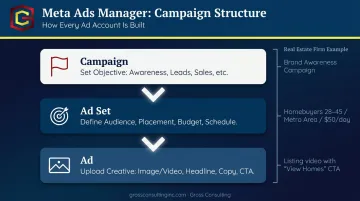
Before you create anything, you need to understand one foundational concept: Meta Ads Manager operates on a three-tier hierarchy.
Campaign → Ad Set → Ad
Every paid campaign you build follows this structure. Here's what each level does:
Campaign Level
This is where you choose your objective — the overarching goal that tells Meta's delivery system what outcome to optimize for. Meta currently offers six objectives:
- Awareness: reach people likely to remember your brand
- Traffic: drive visits to your website or landing page
- Engagement: generate post interactions, video views, or messages
- Leads: collect contact info via lead forms or your website
- App Promotion: drive installs or in-app actions
- Sales: drive purchases or conversion events
The objective you choose shapes how Meta distributes your ad. A Leads campaign will find people statistically more likely to submit a form; a Traffic campaign prioritizes link clicks.
Ad Set Level
This is where targeting, placement, budget, and schedule live. A single campaign can contain multiple ad sets — each aimed at a different audience segment, placement, or geographic area. This structure allows for direct comparison between targeting approaches without mixing results.
Ad Level
This is the actual creative your audience sees: the image or video, headline, body copy, and call-to-action button. One ad set can hold multiple ads, letting you test different creative variations against the same audience.
How it works in practice: A real estate investment firm running a Leads campaign might build two ad sets — one targeting homeowners aged 40–60, another targeting accredited investors — with two ad creatives in each. The result: clean, comparable data across both audiences and both creative approaches at the same time.
| Level | Controls |
|---|---|
| Campaign | Objective (Awareness, Leads, Sales, etc.) |
| Ad Set | Audience, placement, budget, schedule |
| Ad | Creative: image/video, headline, copy, CTA |
How to Launch Your First Campaign in Meta Ads Manager
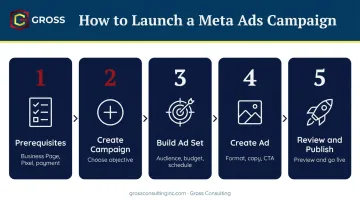
Here's the process, step by step:
Step 1 — Prerequisites
Before your first campaign can go live, you'll need:
- A Facebook Business Page
- A Meta Ads Manager account linked to that page
- A payment method on file
- The Meta Pixel installed on your website (via Events Manager), and ideally the Conversions API configured alongside it for more complete tracking
Step 2 — Create a new campaign
Click the green Create button in the Campaigns tab. Select your objective. Choose between Guided Creation (walks you through each step — recommended for first-timers) or Quick Creation (for experienced users building multiple campaigns efficiently).
Step 3 — Build your ad set
Define your audience using:
- Demographic filters — age, location, gender, and language
- Detailed targeting based on interests and behaviors
- Custom Audiences for people who've already interacted with your business (website visitors, email lists)
- Lookalike Audiences to reach new users who resemble your existing customers
- Advantage+ Audience, Meta's AI-powered option where you provide suggestions and guardrails while the system optimizes delivery
Set your budget type and campaign schedule here as well.
Step 4 — Create your ad
Choose a format:
- Single image or video
- Carousel
- Collection
- Flexible ad — upload up to 10 images or videos and Meta optimizes which format each person sees
Upload your assets, write your headline and copy, and select a call-to-action button.
Step 5 — Review and publish
Preview the ad across mobile and desktop placements. When everything looks right, hit Publish. Meta reviews most ads within 24 hours, though some reviews take longer.
If the setup feels like a lot to manage alongside running your business, Gross Consulting works with clients through every step — from Pixel installation and Conversions API configuration to campaign builds — as a Verified Meta Business Partner.
Budgeting Basics and How to Set Realistic Expectations
The Two Main Budget Types
- Daily Budget — an average amount Meta will spend per day. Per Meta's current guidelines, spend can run up to 75% above your daily budget on high-opportunity days, while weekly spend won't exceed seven times the daily amount
- Lifetime Budget — a fixed total for the entire campaign run, with Meta distributing spend across the duration
- Advantage+ Campaign Budget — formerly called Campaign Budget Optimization (CBO), this lets Meta's AI automatically allocate a single campaign-level budget across ad sets in real time, favoring the best-performing opportunities
Is $20 a Day Enough?
It depends heavily on your industry. Meta's ad system is an auction, and competitive service verticals require meaningful budgets to generate consistent results.
According to WordStream's 2025 Facebook Ads Benchmark report — based on data from more than 1,000 U.S. campaigns — here's what cost per lead looks like across three common service verticals:
| Industry | CPL (Leads Campaigns) |
|---|---|
| Attorneys & Legal Services | $18.17 |
| Physicians & Surgeons | $47.47 |
| Real Estate | $16.61 |
At $20/day, a medical practice would generate about one lead every 2–3 days at median CPL. A $20/day test can validate creative and audience assumptions early on — but to generate consistent inquiries in competitive service categories, most practices need a budget that can sustain volume through the learning phase and beyond.
Funnel-Based Allocation
Once you know what leads cost in your category, the next question is how to distribute budget across the buyer journey. Service businesses typically see better returns by splitting spend across funnel stages rather than concentrating everything on conversion alone:
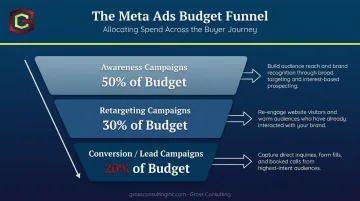
- Awareness campaigns — build audience and brand recognition
- Retargeting campaigns — re-engage website visitors and warm audiences
- Conversion/Lead campaigns — capture direct inquiries and form fills
Tracking and Optimizing Your Results
Where to Find Your Data
The Ads Reporting tab inside Meta Ads Manager shows performance at the campaign, ad set, and individual ad level. Key metrics include:
- Reach and Impressions — how many people saw your ad and how many times
- CTR (Click-Through Rate) — the percentage who clicked
- Cost per Result — what you paid for each lead, click, or conversion
- CPM — cost per 1,000 impressions, useful for awareness campaigns
KPIs by Objective
| Objective | Primary KPIs to Track |
|---|---|
| Leads | Cost per lead, lead volume |
| Traffic | CTR, landing page views |
| Awareness | CPM, reach |
| Sales | ROAS, cost per purchase |
The Learning Phase
Meta's delivery system goes through a learning phase when a new ad set launches or after a significant edit. During this period, results are less stable as the algorithm figures out who responds best to your ads. Ad sets typically exit the learning phase after generating roughly 50 optimization events within one week of the last significant edit.
Don't draw conclusions too early, and hold off on major changes during this window. Significant edits — like large budget increases — restart the learning phase, while smaller, incremental adjustments are less likely to trigger a reset.
Testing consistently — different audiences, creatives, and placements — combined with gradual scaling on top performers helps the algorithm optimize delivery faster. For service businesses that want to skip the trial-and-error, Gross Consulting — a Verified Meta Business Partner — manages this process directly, combining data-driven optimization with hands-on strategy.
Frequently Asked Questions
What is Meta Ads Manager for?
Meta Ads Manager is the platform for creating, managing, and tracking paid ad campaigns across Facebook, Instagram, Messenger, and Meta's broader app network. It gives businesses precise control over who sees their ads, what they see, and what results those ads generate.
How much does Meta Ads Manager cost?
There's no fee to access Meta Ads Manager itself. You pay only for the ads you run, based on the budget you set. Meta charges advertisers as ads run, using payment thresholds or monthly billing cycles depending on account setup.
Is $20 a day enough for Facebook ads?
For testing purposes, yes. For consistent lead generation in competitive service industries like law or healthcare, it often isn't enough. At median CPL benchmarks, $20/day may produce only a handful of leads per month — check current CPL averages for your specific industry before locking in a budget.
What is the difference between Meta Ads Manager and Meta Business Suite?
Ads Manager is exclusively for creating and managing paid campaigns. Meta Business Suite is the broader platform for managing your Facebook and Instagram presence, including organic posts, messages, and page insights — with Ads Manager accessible as one of its tools.
What types of ads can you run in Meta Ads Manager?
The main formats are single image, single video, carousel, collection, and flexible ads (which let Meta choose the best-performing format per viewer). Lead ads capture contact information directly within Meta's platform, and Advantage+ Catalog ads support dynamic retargeting.
How long does it take to see results from Meta ads?
Results are tied to Meta's learning phase, which typically completes after roughly 50 optimization events within a week of your last significant edit. Reach that threshold before drawing conclusions about performance.